
Conditional Date Sorting: A Practical Approach to Sorting with Mixed Date Fields
In Drupal projects, it’s common for Views to display results as lists ordered by date, typically from the most recent content to the oldest. This approach works well when all content types share the same date field, but it can become more complex when each type handles dates differently.
In this article, we’ll walk through a practical example where we create a custom Search API field that stores a date based on the content type. This approach allows us to consistently sort results from different content types without adding complexity to the Views configuration.
The problem: A View with different date criteria depending on the content type.
The conflict arises when a single View needs to display different content types that rely on different date criteria. While some depend on custom publication date fields, others rely solely on the node creation date.
Let’s imagine a website with the following content types:
- Articles: Include a field called field_published_date, which represents the publication date and does not necessarily match the node creation date.
- Impact Story: Uses the content creation date, which is the default date provided by Drupal.
From the user’s perspective, the requirement is straightforward: sort all results by date, from the most recent to the oldest.
That’s rather straightforward at the functional level, however complexity arises at the implementation level. A quick solution might be to sort Articles by field_published_date and Impact Stories by created, but neither Views nor Search API allow conditional logic in sorting criteria (for example, “use this field for one content type and a different field for another”).
As a result, the problem cannot be easily solved through the View configuration alone.
The key idea: a combined date field
Before diving into the solution, it’s worth clarifying the role Search API plays in this scenario. Search API allows you to extend the indexing process through processors, which are components responsible for transforming, calculating, or enriching data before it is stored in the index. This means the logic runs once during indexing, not every time a View is rendered.
In this case, the goal is to solve a sorting requirement that can’t be addressed directly through Views or through Search API’s standard configuration. There are alternatives, such as duplicating the logic in the View, creating multiple displays, or forcing a single date field across all content types, but these approaches increase complexity, reduce flexibility, or make long-term maintenance harder.
The proposed solution is to centralize the date logic during indexing by creating a computed field that represents the correct date based on the content type. This approach allows us to:
- Add a single field to the Search API index.
- Dynamically assign the date value according to each content type’s rules.
- Use that field as the only sorting criterion in the View.
In this way, the new field acts as a normalization point across different content types, defining and storing the appropriate date for each one at indexing time. The result is a simpler View, consistent sorting, and a solution that scales well as new content types are added.
This pattern isn’t limited to dates. The same strategy can be applied to other scenarios where different content types require specific rules, such as priority values, custom states, computed numeric fields, or even normalized text for advanced searching and sorting.
Next, we’ll walk through the implementation step by step. For this example, we’ll start by defining a new field in the Search API index called search_api_combined_sort_date, which will serve as the container for the unified date used for sorting.
/**
* {@inheritdoc}
*/
public function getPropertyDefinitions(DatasourceInterface $datasource = NULL) {

  $properties = [];

  // Only define the property at the index level (not per datasource).
  // This ensures the field is available globally in the Search API index.
  if (!$datasource) {

    // Define the Search API processor property.
    // This field will store a unified date value used for sorting,
    // based on conditional logic (e.g. published date or created date).
    $definition = [
      'label' => $this->t('Combined sort date'),
      'description' => $this->t('Conditional date (field_published_date or created)'),
      'type' => 'date',
      'processor_id' => $this->getPluginId(),
    ];

    // Register the processor property in the index.
    // This field can later be used in Views for sorting results.
    $properties['search_api_combined_sort_date'] = new ProcessorProperty($definition);
  }

  // Return all defined properties.
  return $properties;
}
Next, we define which date should be used based on the content type and assign that value to the new search_api_combined_sort_date field.
/**
* {@inheritdoc}
*/
public function addFieldValues(ItemInterface $item) {

  // Get the original entity being indexed.
  $entity = $item->getOriginalObject()->getValue();

  // Ensure the indexed item is a node entity.
  if ($entity instanceof NodeInterface) {
    $bundle = $entity->bundle();

    // Initialize the date variable.
    // This value will be determined conditionally based on the content type.
    $date = NULL;

    // For Article content type:
    // Use the custom published date field when it is available.
    if ($bundle === 'article' && !$entity->get('field_published_date')->isEmpty()) {
      $date = $entity->get('field_published_date')->value;
    }
    // For Impact Story content type:
    // Use node created date.
    elseif ($bundle === 'impact_story') {
      $date = $entity->getCreatedTime();
    }

    // If a valid date value was resolved, assign it to the Search API field.
    if ($date) {

      // Retrieve all Search API fields that match the processor property path.
      // This allows the processor to support multiple datasources if needed.
      $fields = $this->getFieldsHelper()
       ->filterForPropertyPath($item->getFields(), NULL, 'search_api_combined_sort_date');

      // Populate the combined sort date field with the calculated value.
      // This value will be used later for sorting results in Views.
      foreach ($fields as $field) {
        $field->addValue($date);
      }
    }
  }
}
Benefits of this approach
1. It avoids duplicating fields on nodes, since the date logic is centralized in the index and doesn’t require changes to the content type structure.
2. It’s scalable: when a new Content Type is introduced, you only need to add an additional condition in the processor, without modifying the View.
3. It improves performance, because the logic runs during indexing rather than every time a user accesses the View.
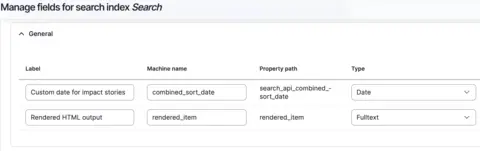
4. The View remains clean and easy to maintain.
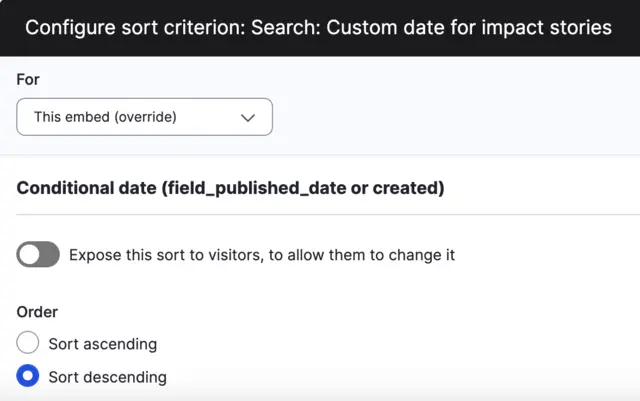
Conclusion
Generally, when using Views, a sorting criterion is defined based on the title or the creation date, and it’s configured to sort in ascending or descending order. However, there are scenarios where each Content Type needs to use a different field for sorting. In these cases, a Search API processor provides an elegant solution, as it allows multiple sorting criteria to be unified into a single field without impacting page performance. This is possible because the logic runs during data indexing, not when the View is rendered.
Recommended resources
_______
Ivan Mendoza is a senior Drupal developer at Rootstack.

